
How Digital Estimate Approval Speeds Up Repair Authorization
Key Takeaways
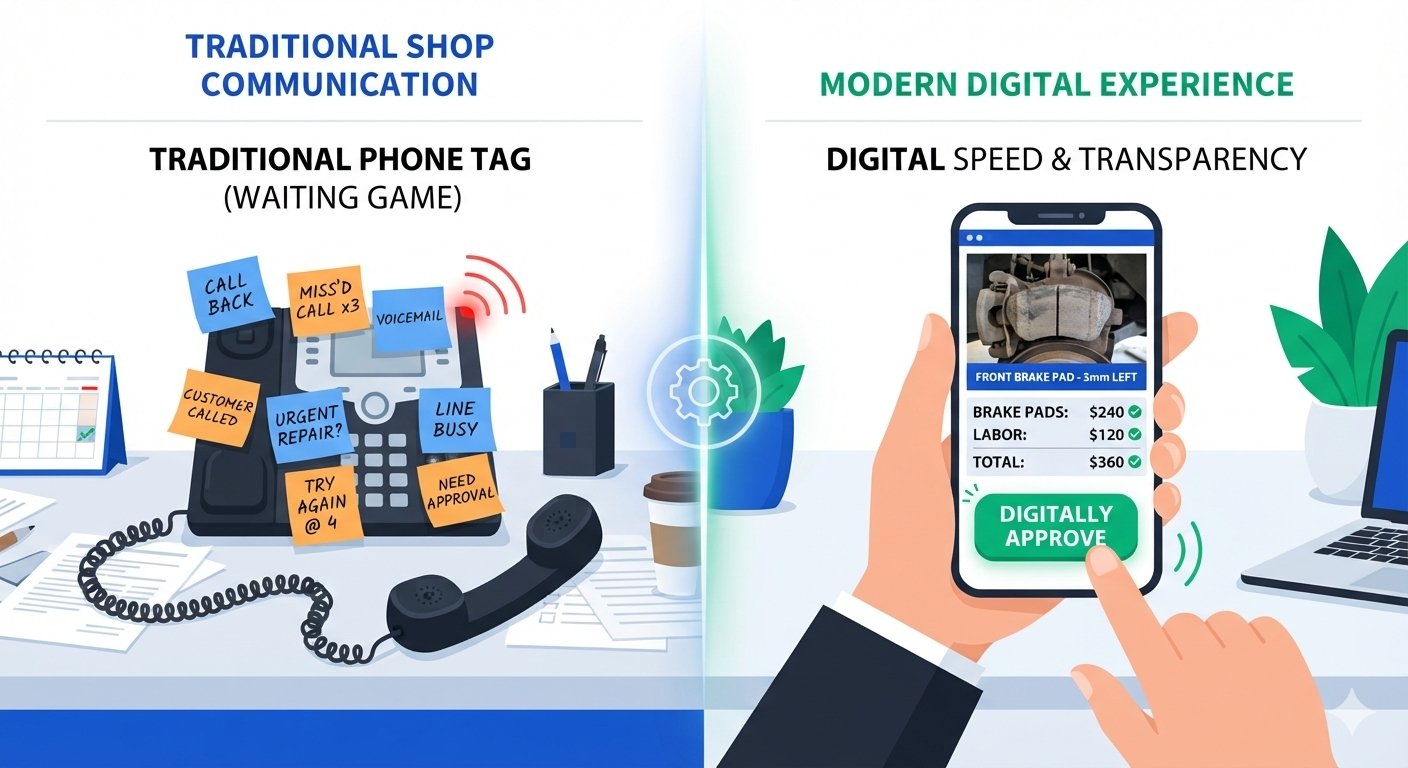
- Digital estimate approval means no more phone tag. Customers can view and approve repairs remotely.
- Convenient approval options via SMS, email, mobile & customer portal.
- DVI photos and videos can assist in explaining to customers why a repair is recommended.
- Digital authorization, when properly implemented and maintained, provides a better audit trail for approvals.
- Measure the approval time and the authorization rate to see if the workflow is really improving performance.
- “Digital approval helps with revenue recovery by reducing the delay from estimate to customer decision.
- Technology should be an adviser’s assistant, not a substitute for straightforward communication and human follow-up.
Introduction
A customer doesn’t need to reject a repair to delay it. Sometimes they simply don’t answer the phone.
For a busy service advisor, that missed call can turn into another voicemail, another callback, and another hour before a vehicle can move forward. Digital estimate approval auto repair workflows remove much of that back-and-forth by letting customers review and authorize work from a phone, tablet, or computer.
The result isn’t just convenience. A well-designed approval process can make authorization easier to track, reduce communication friction, and give your team a clearer path from estimate to approved repair.
Quick Answer: Digital estimate approval speeds up repair authorization by enabling customers to view estimates and approve work electronically, not just by phone call, but through SMS, email, mobile links, or customer portals.
Table of Contents
- What Is Digital Estimate Approval in Auto Repair?
- The Friction of Phone Tag and What It Costs
- Online Repair Authorization Options
- Are Digital Approvals Legally Valid?
- Integrating Digital Vehicle Inspection for Zero Manual Entry
- Best Practices for Faster Digital Approval
- Track Approval Time and Authorization Rate
- 5 Digital Approval Mistakes to Avoid
- Example: Phone Approval vs. Digital Approval
- How Digital Approval Supports Revenue Recovery
- Free Digital Estimate Approval Checklist
- Frequently Asked Questions
- Conclusion
What Is Digital Estimate Approval in Auto Repair?
Digital estimate approval is the process of sending a repair estimate electronically so the customer can review recommended work and provide authorization online.
Depending on the system, the customer may receive a secure link by text or email, review parts and labor, see inspection photos or videos, and approve or decline the work.
Some platforms also capture an electronic signature, timestamp, and approval history. For example, repair-management platforms currently offer approval links and digital signatures that connect authorization records to the repair order.
The basic workflow is:
Inspection → Estimate → Digital Delivery → Customer Review → Approval → Repair
That is much simpler than asking a customer to repeatedly call the shop.
The Friction of Phone Tag and What It Costs
Phone calls still matter in auto repair. They are often the best option when a customer has questions or a complicated repair needs explanation.
The problem comes when phone tag becomes the only approval method.
Imagine this:
Advisor calls → Customer misses call → Voicemail → Customer calls later → Advisor is with another customer → Callback → Approval.
Every step creates another opportunity for delay.
Digital approval gives the customer another route. They can open an email estimate or text message when they have a moment and review the recommendation without waiting for the advisor to become available.
Why Speed Matters
A pending estimate is still an unresolved repair opportunity.
If your shop wants better authorization rate optimization, don’t only measure how many estimates get approved. Measure how long customers take to approve them.
That gives you a second KPI: approval speed.
Online Repair Authorization Options
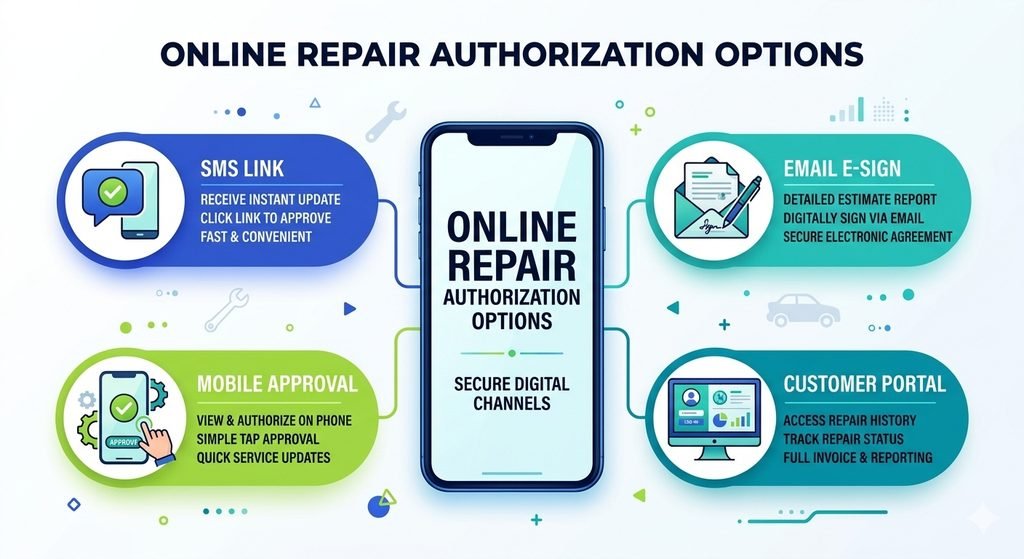
Different customers prefer different communication channels. A strong online repair authorization process gives them practical choices.
| Method | How It Works | Best Use |
| SMS approval | Customer receives a secure approval link | Fast decisions |
| Email estimate | Detailed estimate sent by email | Reviewing larger repairs |
| Mobile approval | Customer approves from a phone | Customers away from the shop |
| Customer portal | Estimate and service information in one place | Repeat customers |
The goal isn’t to use every option. It’s to choose a workflow that removes unnecessary steps.
Text-to-Approve: SMS Approval Link
With a text-to-approve repair workflow, the customer receives a message containing a secure estimate link.
They can review the work, inspect supporting information, and approve or decline from their device.
Some current auto repair platforms specifically support text or email delivery with customer approval from a mobile device.
Best practice: Keep the message short and make the next action obvious.
Email Estimate With E-Sign
An e-sign auto repair estimate can provide a more formal approval workflow.
The customer can:
- Open the estimate.
- Review parts and labor.
- View supporting inspection evidence.
- Sign or authorize electronically.
- Receive confirmation.
The shop should retain the appropriate authorization record according to its processes and applicable requirements.
Mobile Estimate Approval
Mobile estimate approval is useful because customers don’t have to be sitting in the waiting room.
They may be:
- At work
- At home
- Travelling
- Unable to answer calls
If they can safely review the estimate from their device, they have another opportunity to make a decision.
Customer Portal
A CRM customer portal can bring estimates, inspection information, approvals, and service records into one customer-facing location.
That becomes especially useful for customers who return to the same shop regularly.
Are Digital Approvals Legally Valid?
Digital authorization can create a useful electronic record, but don’t treat one workflow as legally valid everywhere.
Requirements can vary by jurisdiction, transaction, communication method, and the specific electronic-signature process.
What Should Shops Record?
A well-designed approval workflow should make it possible to retain information such as:
- Customer identity
- Estimate version
- Approved work
- Date and time
- Electronic signature, where applicable
- Communication history
- Approval or decline status
Electronic-signature features in repair software can also create an audit trail of authorization activity.
For legal or compliance questions, have the final process reviewed against the requirements that apply to your location.
Integrating Digital Vehicle Inspection for Zero Manual Entry
Digital approval becomes more useful when it connects with digital vehicle inspection.
Instead of creating an estimate separately and manually copying information between systems, the workflow can look like:
DVI Finding → Photo/Video Evidence → Estimate → Customer Link → Digital Authorization → CRM/Repair Order Update
This can support zero manual entry between connected systems where the software actually provides that integration.
DVI platforms can attach inspection checkpoints, technician notes, and vehicle photos to repair orders, while customer-approval tools can connect the resulting estimate to an authorization record.
Here’s the important distinction: integration should reduce work for the shop, not simply move the same work into another screen.
Best Practices for Faster Digital Approval
Use Short, Clear Messages
A simple message works better than a paragraph of instructions:
Your vehicle inspection and repair estimate are ready. Review the recommended work and authorize it securely here: [link]
Send the Estimate Promptly
Don’t make a customer wait hours for an estimate that is already complete.
Send it when the information has been reviewed and is ready for customer discussion.
Use Relevant Photo and Video Evidence
A photo showing the actual issue can answer a question that five sentences might not.
Don’t attach everything. Show evidence that directly supports the recommendation.
Give Customers a Way to Ask Questions
Digital approval shouldn’t remove the human advisor.
If a customer isn’t comfortable approving the estimate, make it easy to contact the shop.
Track Approval Time and Authorization Rate
Digital approval isn’t successful simply because the shop has installed the technology.
Measure the outcome.
Track:
- Average approval time
- Authorization rate
- Pending estimates
- Declined estimates
- Approved estimate value
- Follow-up response rate
- Recovered revenue
First, establish your own baseline.
Then compare results after implementation.
For example, if your average approval time falls from 90 minutes to 30 minutes, you’ve reduced the approval delay by 60 minutes. That’s an illustrative calculation, not an industry benchmark.
Connect these measurements with the broader authorization rate optimization strategy in the pillar article, A Step-by-Step Guide to Boost Authorization Rates in Auto Repair.
5 Digital Approval Mistakes to Avoid
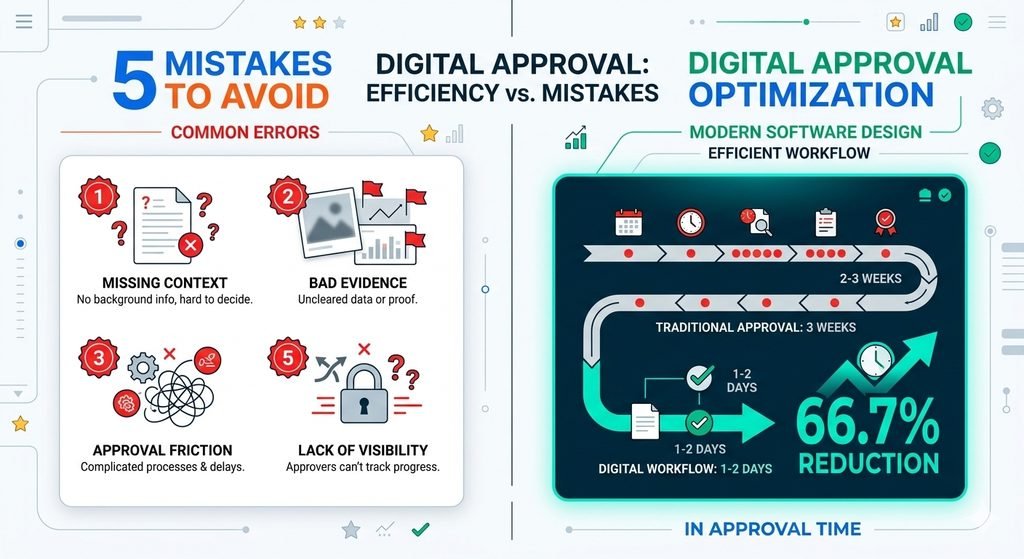
1. Sending an Estimate Without Context
A customer should understand what the recommended repair addresses.
2. Making Approval Complicated
If it takes too many clicks to authorize, you’ve recreated the friction you’re trying to remove.
3. Using Poor Evidence
Irrelevant or unclear photos can create more questions instead of answering them.
4. Failing to Record Authorization
A digital approval process should create a clear record of what was approved and when.
5. Replacing Human Communication Completely
Technology should support advisors, not eliminate them.
Customers still need someone to explain complicated repairs and answer questions.
Example: Phone Approval vs. Digital Approval
Consider a hypothetical repair shop.
With a phone-based process:
Estimate → Call → Voicemail → Callback → Questions → Approval → Manual Record
With a digital workflow:
Estimate → SMS/Email → Customer Review → Digital Approval → Record Updated
Suppose the first process takes an average of 90 minutes and the second takes 30 minutes.
That’s a 66.7% reduction in approval time.
Again, this is an illustrative example, not verified industry data. Your actual results will depend on customer behavior, estimate complexity, communication quality, and the software being used.
The important point is that digital approval removes several steps between estimate ready and customer decision.
How Digital Approval Supports Revenue Recovery
A pending estimate isn’t necessarily lost business.
The customer may simply be waiting for a convenient time to review it.
That’s why digital approval fits naturally into a broader revenue recovery strategy. It can help the shop move an estimate from waiting for a response to approved, declined, or ready for follow-up.
If the customer doesn’t approve, the shop still has a clearer status and can use its normal follow-up process.
Free Digital Estimate Approval Checklist
Want to identify approval friction in your own shop?
Create a downloadable Digital Estimate Approval Checklist covering:
- SMS and email workflows
- Estimate presentation
- DVI evidence
- Digital signatures
- Approval records
- Follow-up timing
- Authorization-rate tracking
Place the lead magnet after the best-practices section with a CTA such as:
Download the free checklist and find the approval delays costing your shop time and revenue.
An exit-intent version can use the same offer rather than displaying an unrelated newsletter popup.
Conclusion
Digital estimate approval auto repair workflows solve a simple problem: customers shouldn’t have to play phone tag just to say yes.
SMS links, email estimates, e-signatures, mobile approval, and customer portals can give customers a faster way to review and authorize work.
But technology alone isn’t the strategy.
The strongest process combines clear estimates, useful DVI evidence, convenient approval, accurate record-keeping, CRM integration, and human follow-up.
For shops focused on authorization rate optimization, the next step is to measure approval time and authorization rate before and after introducing digital workflows.
When approval becomes easier, the path from estimate to authorized repair becomes easier to manage too.
Frequently Asked Questions
What is digital estimate approval in auto repair?
It lets customers review repair estimates electronically and authorize recommended work through a phone, email, mobile link, or customer portal.
How does online repair authorization speed up repairs?
It eliminates phone tag by allowing customers to review and approve estimates at their convenience, while giving the shop a better authorization record.
Can customers approve auto repair estimates by text?
Yes. Some repair-management systems provide secure SMS links that let customers review and approve estimates from their phones.
Is an electronic signature valid for an auto repair estimate?
Electronic signatures can be legally recognized in many jurisdictions, but requirements vary. Shops should use appropriate systems and retain the required records.
Does digital approval increase authorization rates?
It can reduce friction and approval delays, but shops should measure their own authorization rate before and after implementation, rather than assume guaranteed improvement.
Back to the previous article